
Corsair Vengeance RGB DDR5-7000 C40 64GB Kit Review
A computing enthusiast asking “Which 64GB DDR5 kit should I buy” set us on our mission: Since current 64GB performance kits were cheaper than the basic parts we’d tested two years ago, the market was ripe with better solutions. We asked around and eventually came up with a few kits to compare, along with a clarification of the question: Without asking for further details about the system, which high-performance 64GB UDIMM kit would be easiest for us to recommend?
Corsair’s suggestion, its Vengeance RGB DDR5-7400 C40, enters the fray today.
| Corsair Vengeance RGB CMH64GX5M2B7000C40 | G.Skill Trident Z5 Royal F5-6400J3239G32GX2 | Fury Beast RGB EXPO KF564C32BBEAK2-64 | Crucial CUDIMM CT2K32G64C52CU5 | |
| Capacity | 64 GB (2x 32GB) | 64 GB (2x 32GB) | 64 GB (2x 32GB) | 64 GB (2x 32GB) |
| Data Rate | DDR5-7000 (XMP) | DDR5-6400 (XMP) | DDR5-6400 (XMP) | DDR5-6400 (JEDEC) |
| Primary Timings | 40-52-52-114 (2T) | 32-39-39-102 (2T) | 32-39-39-80 (2T) | 52-52-52-103 (2T) |
| Voltage | 1.40 Volts | 1.40 Volts | 1.40 Volts | 1.10 Volts |
| Height | 44.8 mm | 44mm | 42mm | 32mm |
| Warranty | Lifetime | Lifetime | Lifetime | Lifetime |
| Current Price | $483.00 | $500.00 | $342.00 | $357.00 |
Find It at Newegg
(Click For Availability)
Vengeance RGB DDR5-7000 In Detail
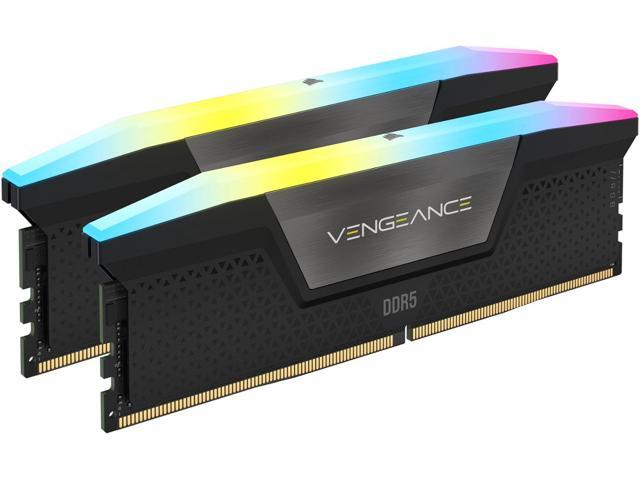
Sold as part number CMH64GX5M2B7000C40, the Vengeance RGB DDR5-7000 kit’s modules are a little taller than the compared RGB kits, and much taller than the lightless Crucial CUDIMMs.
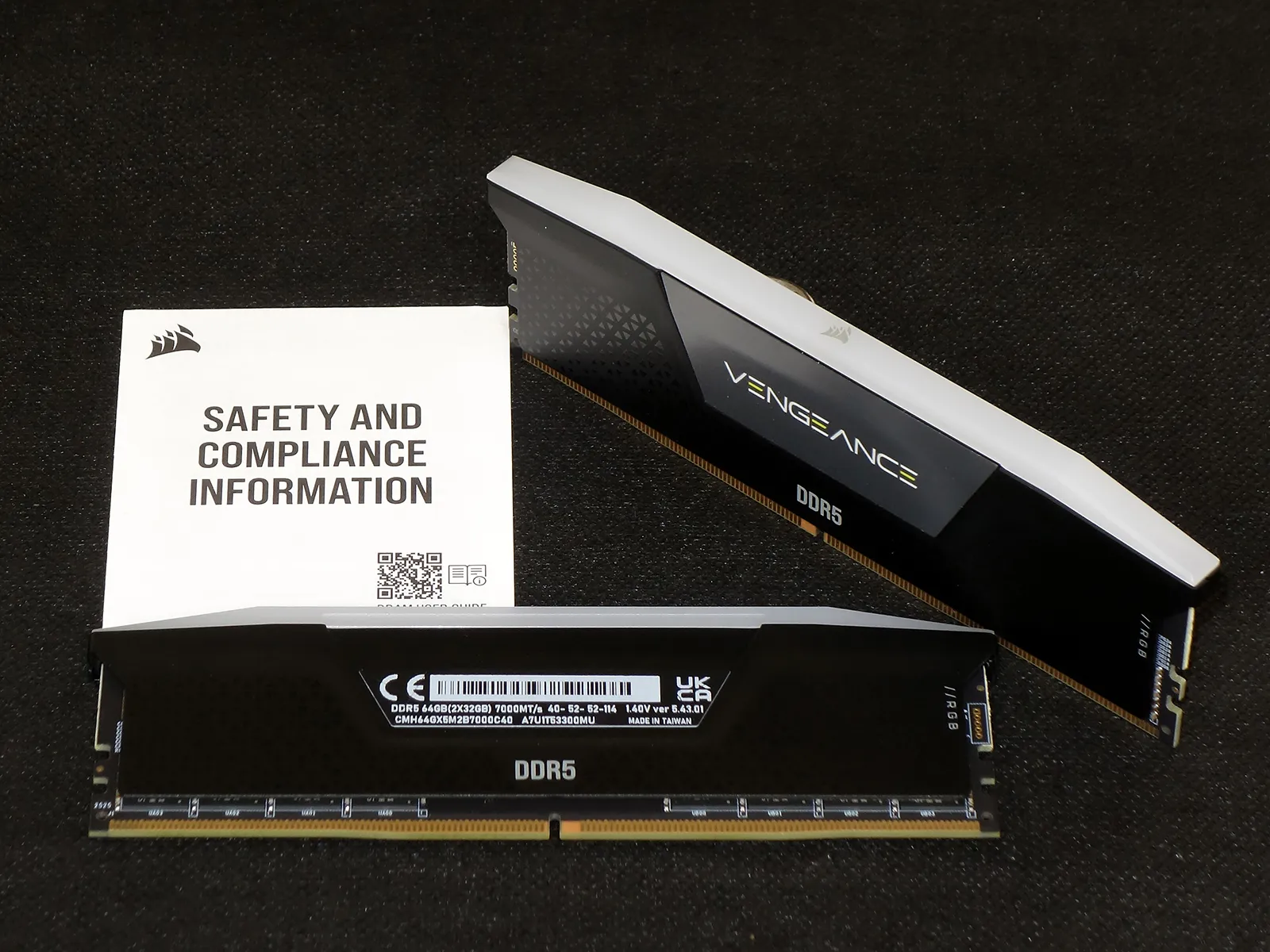
A higher XMP data rate than the modules we’re comparing should help this Vengeance RGB win bandwidth benchmarks, though its looser timings will probably drop it to third place in latency-dependent tests. Our motherboard configured the kit to DDR5-4800 CAS40 by default and jumped directly to DDR5-7000 after enabling XMP Profile 1 in motherboard firmware.
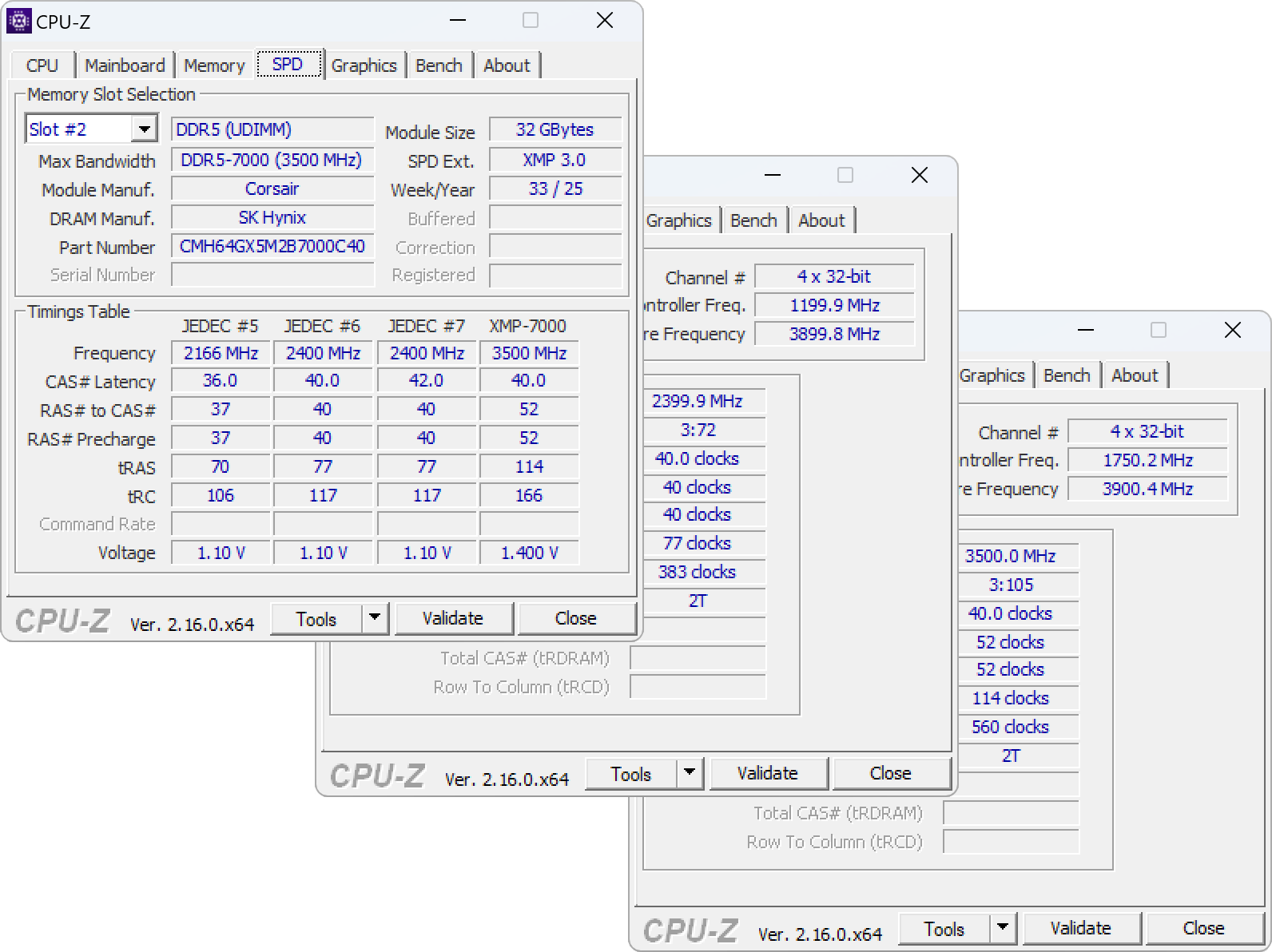
As with its G.Skill and Kingston counterparts, each Corsair Vengeance module uses sixteen Hynix 16Gb (sixteen gigabit) ICs-eight on each side-to fill its 32GB per-DIMM capacity. All three appear to be classic A-Die parts, and that explains why all three use similar voltage levels and per-clock timings. Remembering that XMP profiles are overclocking profiles, Corsair’s kit is more limited in that it lacks fallback XMPs of DDR5-6400 or DDR5-6000 for use by motherboards or CPU that aren’t stable at its full rating. This kit doesn’t even have a high non-XMP setting such as DDR5-5600 to use by owners who can’t find the XMP setting: It’s going to run at DDR5-7000 C40 or DDR5-4800 C40.
| Memory SPD | |||
| Module Manufacturer(ID) | Corsair | XMP profile | XMP-7000 |
| SDRAM Manufacturer (ID) | SK Hynix | Specification | Profile 1 |
| Size | 32768 MBytes | VDD Voltage | 1.400 Volts |
| PMIC #0 | Enabled | VDDQ Voltage | 1.400 Volts |
| PMIC #0 Manufacturer | Monolithic Power Systems | VPP Voltage | 1.800 Volts |
| PMIC #1 | Disabled | Memory Controller Volt. | 1.200 Volts |
| PMIC #2 | Disabled | Min Cycle time | 0.285 ns (3500 MHz) |
| Clock Driver (CKD) | Disabled | Max CL | 40 |
| Max bandwidth | DDR5-7000 (3500 MHz) | Min tRP | 14.82 ns |
| Max JEDEC | DDR5-4800 (2400 MHz) | Min tRCD | 14.82 ns |
| Channels | 2 | Min tRAS | 32.49 ns |
| Part number | CMH64GX5M2B7000C40 | Min tRC | 47.31 ns |
| Manufacturing date | Week 33/Year 25 | XMP timings table | CL-tRCD-tRP-tRAS-tRC-CR @ frequency (voltage) |
| Nominal Voltage | 1.10 Volts | XMP #1 | 22.0-29-29-63-92-n.a @ 1929 MHz (1.400 Volts) |
| Temperature Limit | 55.0 degC (high limit), 85.0 degC (critical limit) | XMP #2 | 28.0-37-37-80-117-n.a @ 2456 MHz (1.400 Volts) |
| EPP | no | XMP #3 | 30.0-39-39-86-125-n.a @ 2631 MHz (1.400 Volts) |
| XMP | yes, rev. 3.0 | XMP #4 | 32.0-42-42-92-133-n.a @ 2807 MHz (1.400 Volts) |
| AMP | no | XMP #5 | 36.0-47-47-103-150-n.a @ 3157 MHz (1.400 Volts) |
| EXPO | no | XMP #6 | 40.0-52-52-114-166-n.a @ 3500 MHz (1.400 Volts) |
| JEDEC timings table | CL-tRCD-tRP-tRAS-tRC @ frequency | XMP #7 | 42.0-52-52-114-166-n.a @ 3500 MHz (1.400 Volts) |
| JEDEC #1 | 22.0-23-23-43-65 @ 1333 MHz | XMP #8 | 46.0-52-52-114-166-n.a @ 3500 MHz (1.400 Volts) |
| JEDEC #2 | 28.0-28-28-54-82 @ 1666 MHz | XMP #9 | 50.0-52-52-114-166-n.a @ 3500 MHz (1.400 Volts) |
| JEDEC #3 | 30.0-30-30-58-88 @ 1800 MHz | XMP #10 | 52.0-52-52-114-166-n.a @ 3500 MHz (1.400 Volts) |
| JEDEC #4 | 32.0-33-33-62-95 @ 1933 MHz | XMP #11 | 56.0-52-52-114-166-n.a @ 3500 MHz (1.400 Volts) |
| JEDEC #5 | 36.0-37-37-70-106 @ 2166 MHz | XMP #12 | 58.0-52-52-114-166-n.a @ 3500 MHz (1.400 Volts) |
| JEDEC #6 | 40.0-40-40-77-117 @ 2400 MHz | XMP #13 | 60.0-52-52-114-166-n.a @ 3500 MHz (1.400 Volts) |
| JEDEC #7 | 42.0-40-40-77-117 @ 2400 MHz | XMP #14 | 64.0-52-52-114-166-n.a @ 3500 MHz (1.400 Volts) |
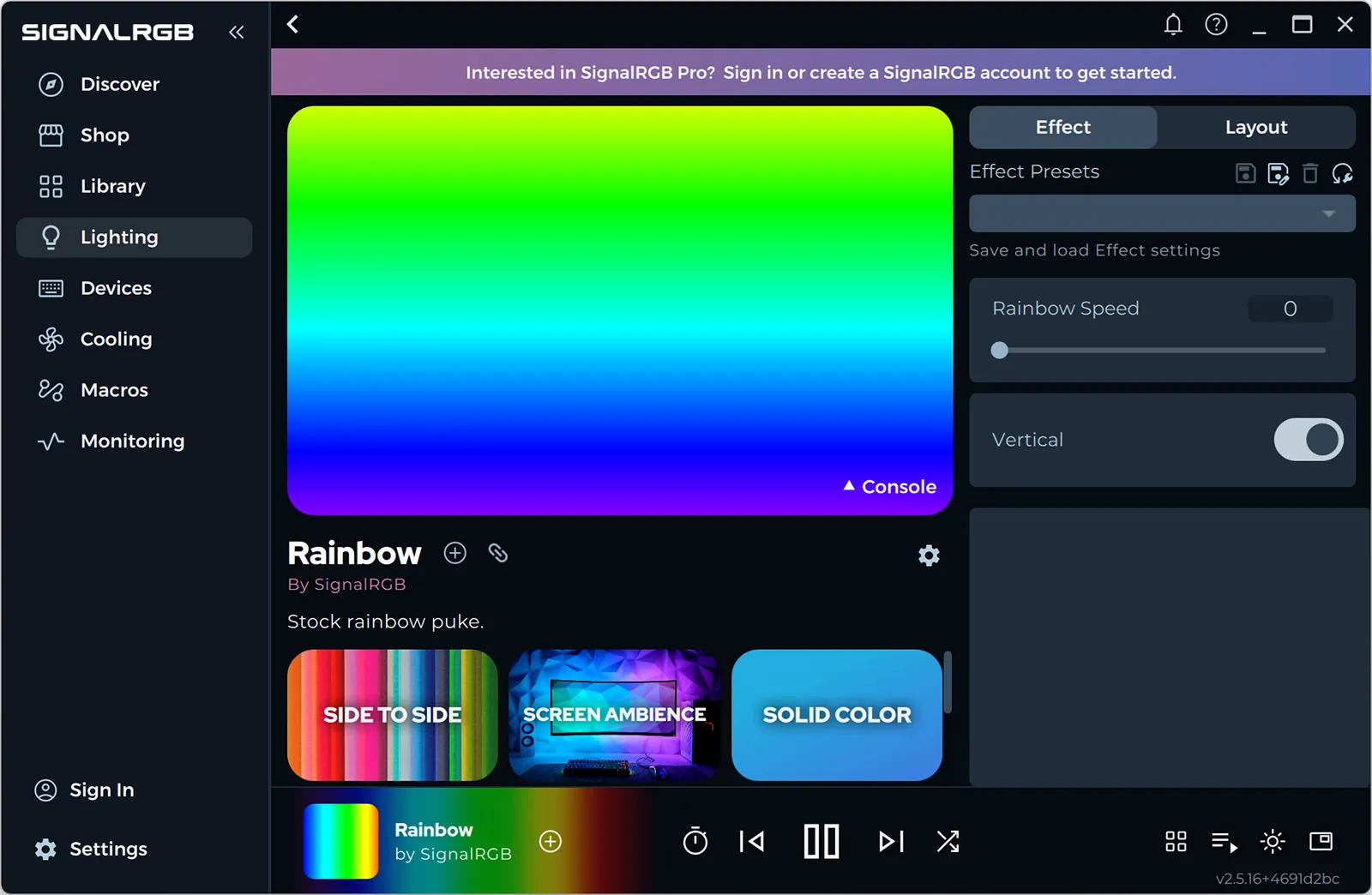
Our ASRock motherboard got caught a little flat footed on RGB support, as its latest final Polychrome Sync release is nearly a year old and doesn’t recognize the kit’s RGB controller. ASRock does distribute a version of Signal RGB that’s compatible with both this motherboard and Corsair’s Vengeance DDR5 RGB, so we used that instead.
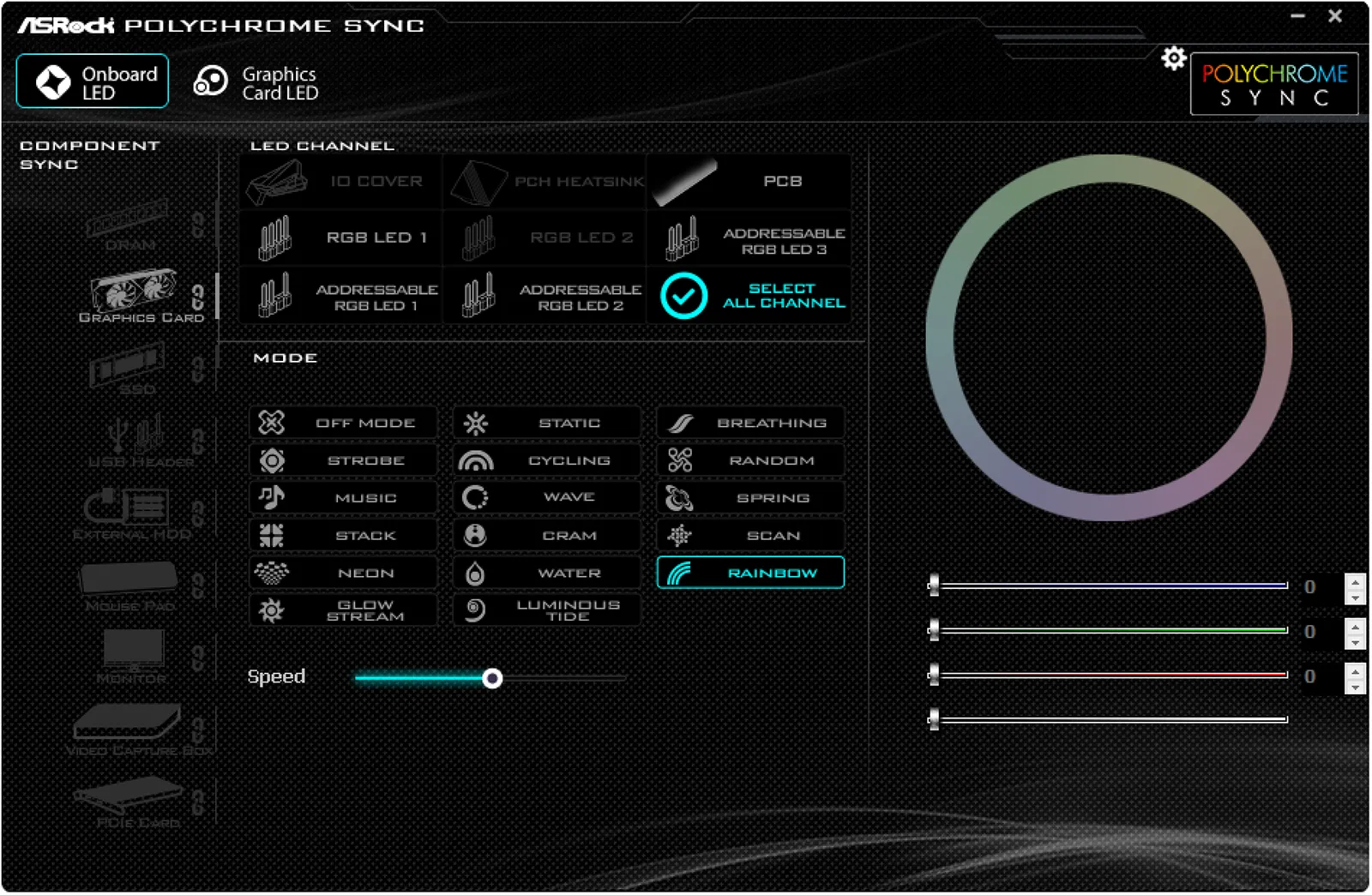
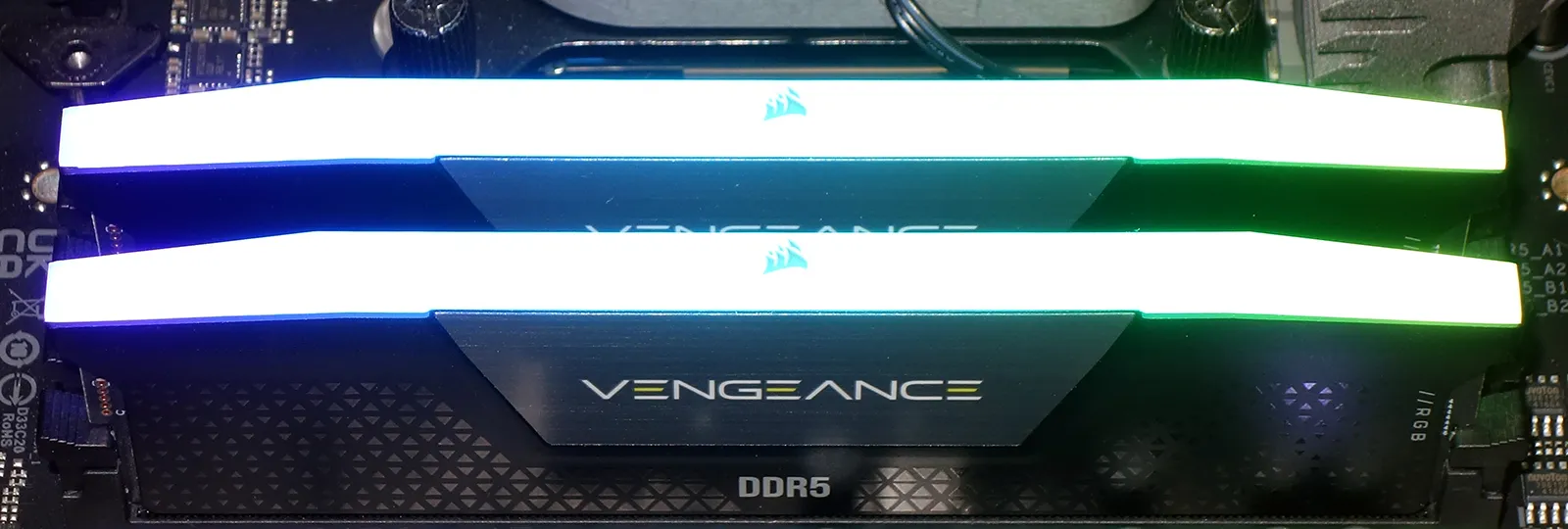
Blame our photographic techniques or the limitations of its technology for the washed out light diffuser images, as we tried multiple camera settings, increased background lighting and even an alternative camera only to face similar results: Colors that appear vibrant to our eyes get washed out by the camera as it attempts to make the dark parts of our images discernable.
Our Test
Intel’s Core Ultra 9 285K will provide the load for evaluating today’s Vengeance RGB DDR5-7000 64GB kit, while ASRock’s Z890 Taichi Lite provides the stable input voltage and timing adjustments to get us to our goals.
| Test Hardware | |
| CPU | Intel Core Ultra 9 285K: 24 Cores, 36M Cache, 3.2- 5.70 GHz, LGA 1851 |
| CPU Cooler | Alphacool Core 1 Aurora CPU, VPP655 with Eisbecher D5 150mm, NexXxoS UT60 X-Flow |
| Motherboard | ASRock Z890 Taichi Lite, BIOS 3.04 |
| Graphics | ASRock RX 7700 XT Phantom Gaming 12GB OC |
| Hard Drive | Crucial T700 PCIe Gen5 2TB M.2 SSD |
Vengeance DDR5 RGB Overclocking & Latency Tuning
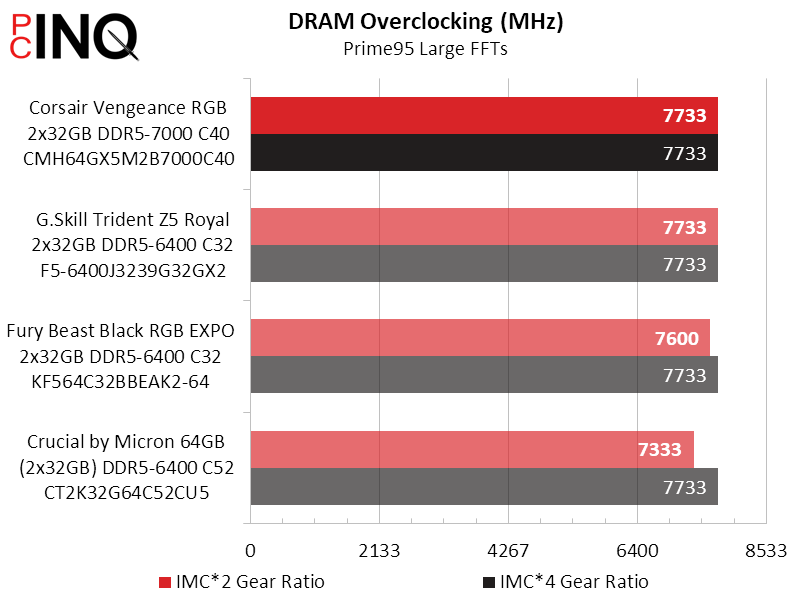
Over several years we’ve gradually loosened ourDDR5 timings for overclocking to 48-56-56-112 to reach data rates up to 8133 on single-sided modules, but found a slightly lower limit on today’s double-sided modules (we still have difficulty calling each side one “rank” when DDR5 splits it into two 32-bit segments). Regardless of linguistics, our platform seems to hit a DDR5-7733 speed limit when forced to address this many memory ranks.
We were happy to see Vengeance DDR5-7000 running our DDR5-6400 custom timing test at CAS 28 for the first hour our so, after which we started seeing errors that never went away. We backed it off to the same 30-37-37-74 as the other two Hynix-IC kits.
| Lowest Stable Timings | |||
| DDR5-6400 | DDR5-5600 | DDR5-4800 | |
| Corsair Vengeance RGB CMH64GX5M2B7000C40 | 30-37-37-74 (2T) | 26-33-33-66 (2T) | 24-27-27-54 (2T) |
| G.Skill Trident Z5 Royal F5-6400J3239G32GX2 | 30-37-37-74 (2T) | 28-33-33-66 (2T) | 24-27-27-54 (2T) |
| Fury Beast RGB EXPO KF564C32BBEAK2-64 | 30-37-37-74 (2T) | 28-33-33-66 (2T) | 24-27-27-54 (2T) |
| Crucial CUDIMM CT2K32G64C52CU5 | 40-48-48-96 (2T) | 38-42-42-84 (2T) | 34-34-34-68 (2T) |
Vengeance DDR5 RGB Benchmark Results
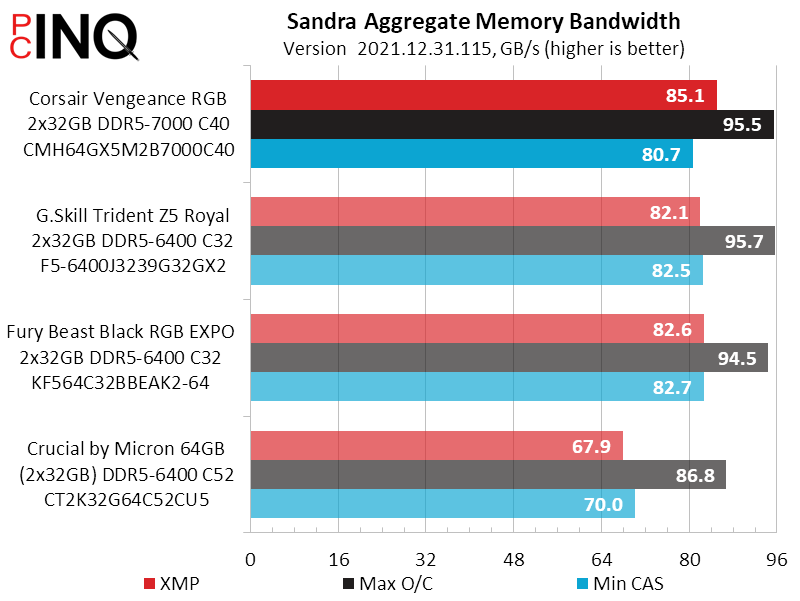
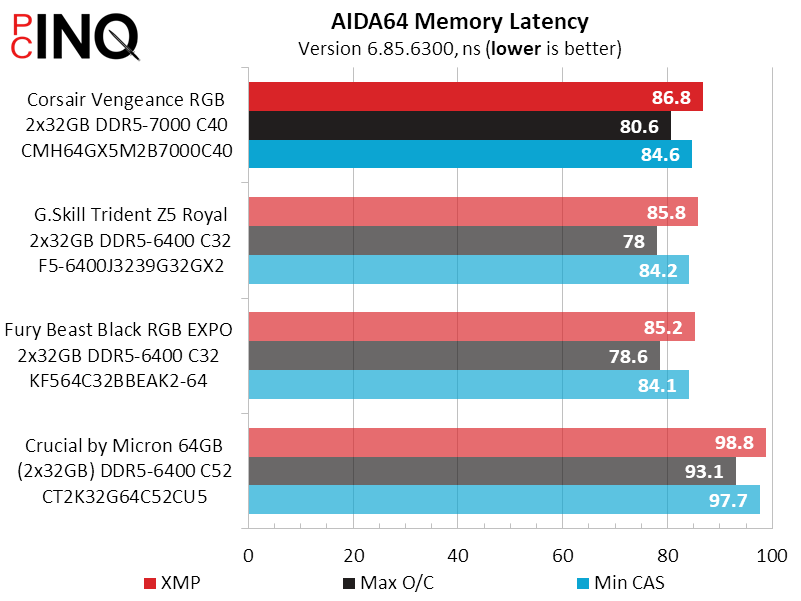
Though it had roughly the same overclocked bandwidth as the other two similarly-equipped kits, the Vengeance RGB’s higher XMP reached its expected lead in synthetic bandwidth tests. Unfortunately, its 40-cycle CAS suffered losses in synthetic latency measurements despite the fact that DDR5-7000 cycles take less time than DDR5-6400 cycles.
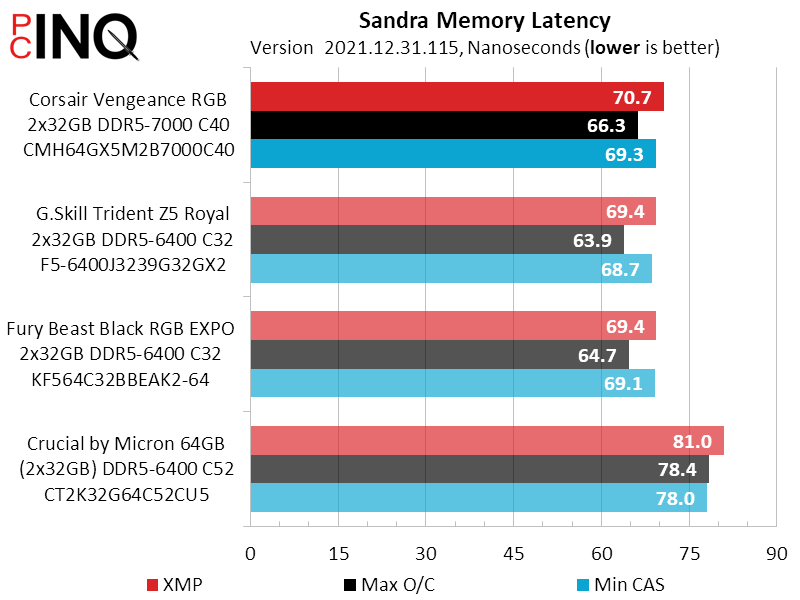
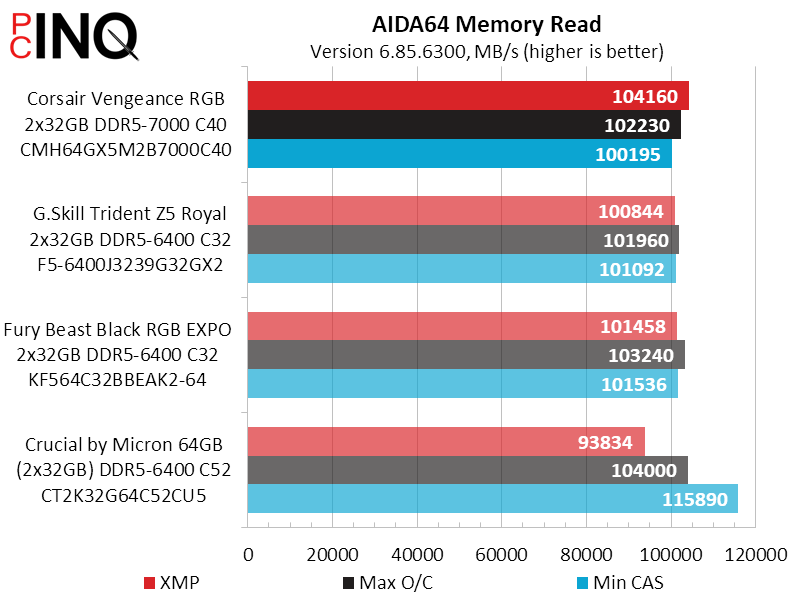
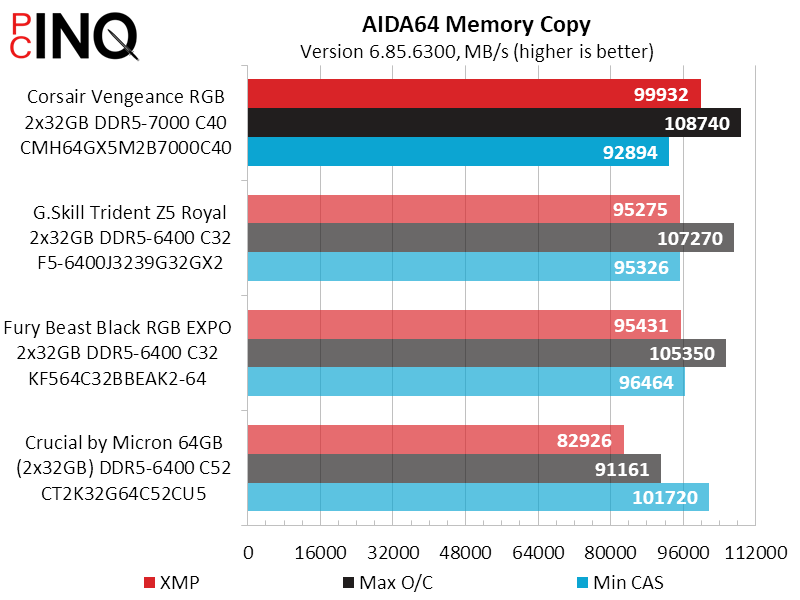
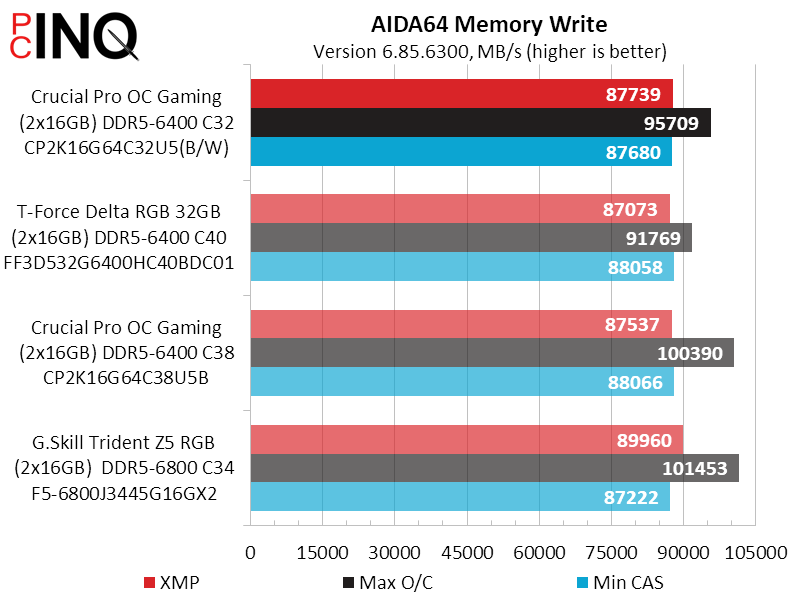
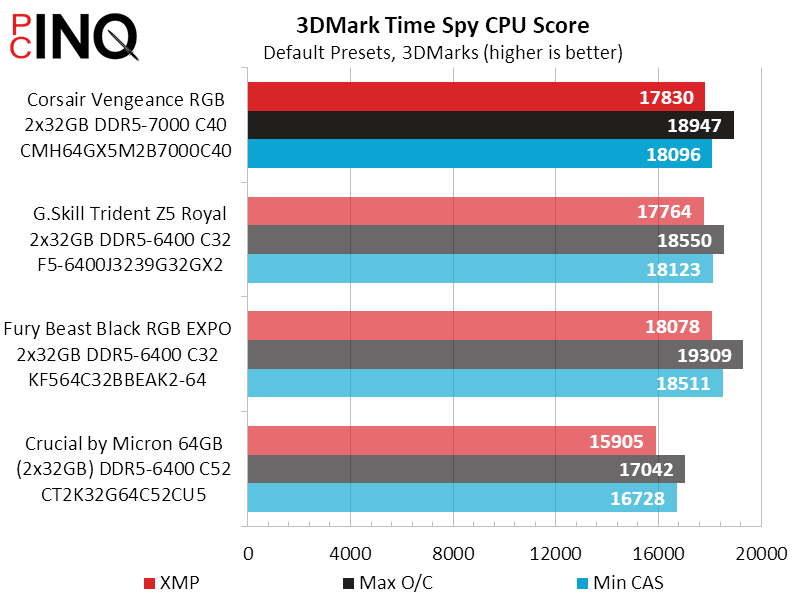
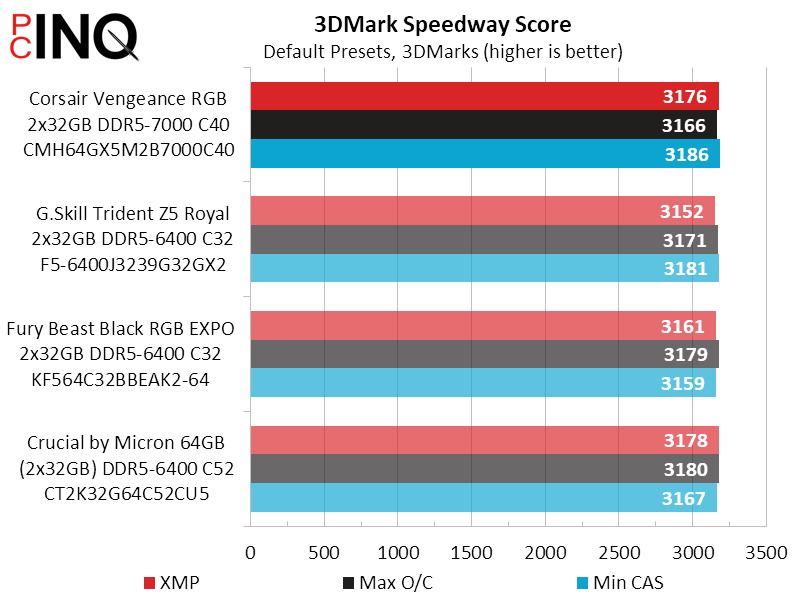
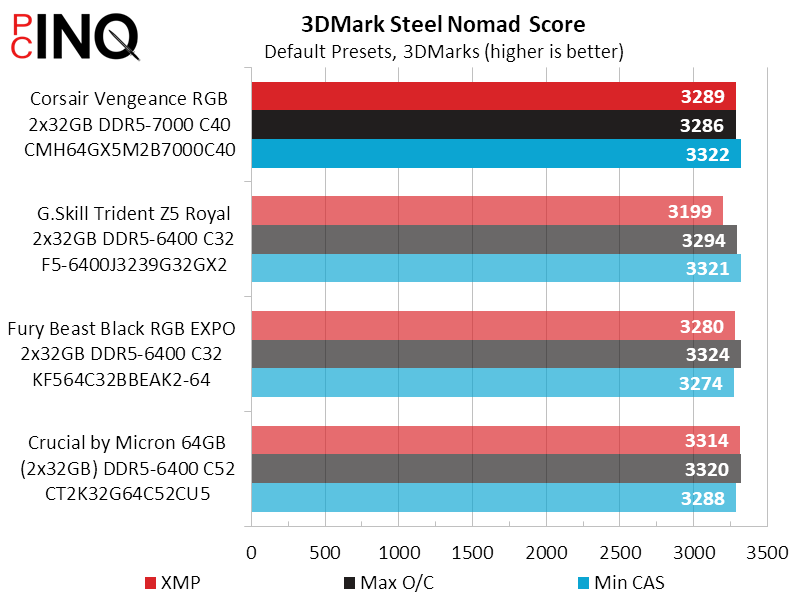
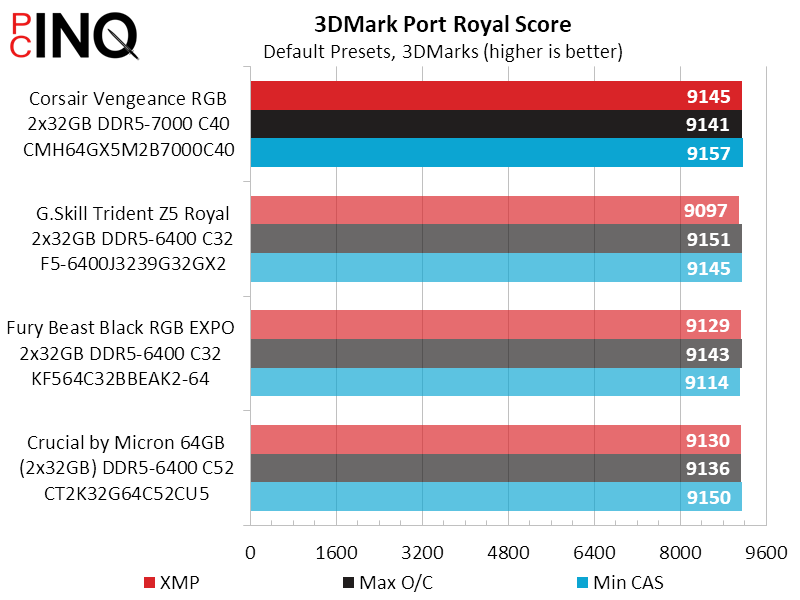
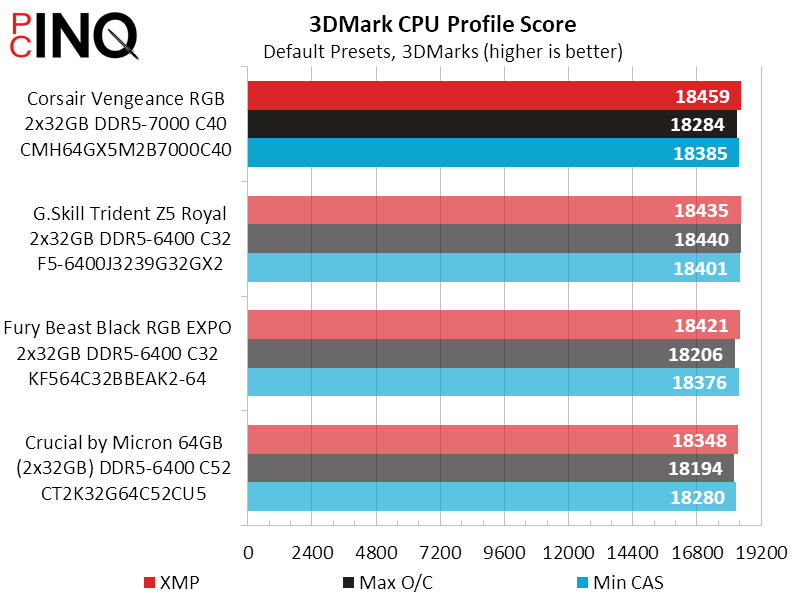
Vengeance RGB DDR5-7000 took a couple tiny leads, for what they’re worth, in 3DMark.
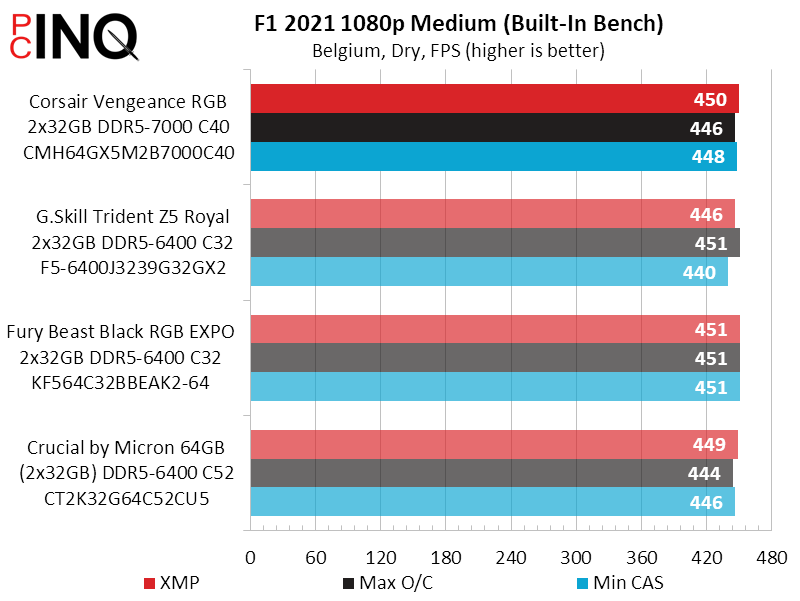
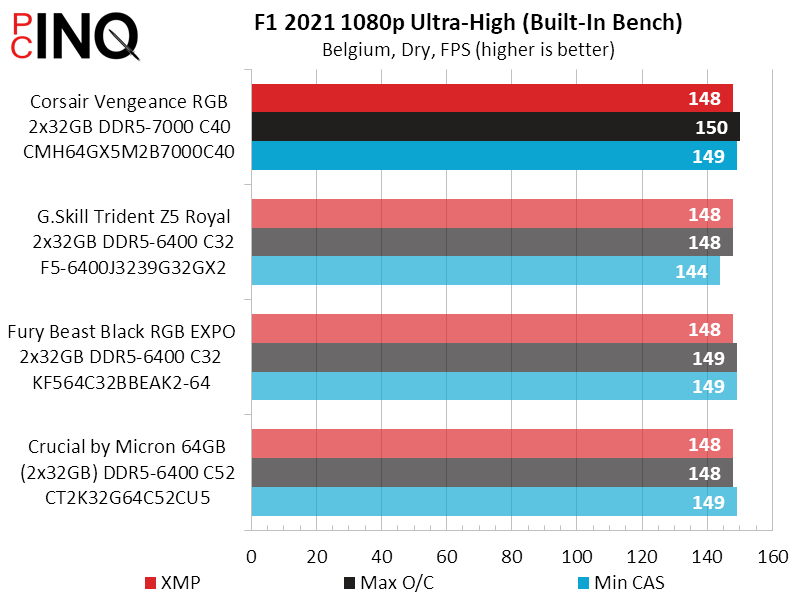
Our gaming tests primarily shows us how the extra latency of standard (non-enhanced) memory can shave a few percent from the high frame rates of low-stress test settings (such as SOTR 1080p Medium).
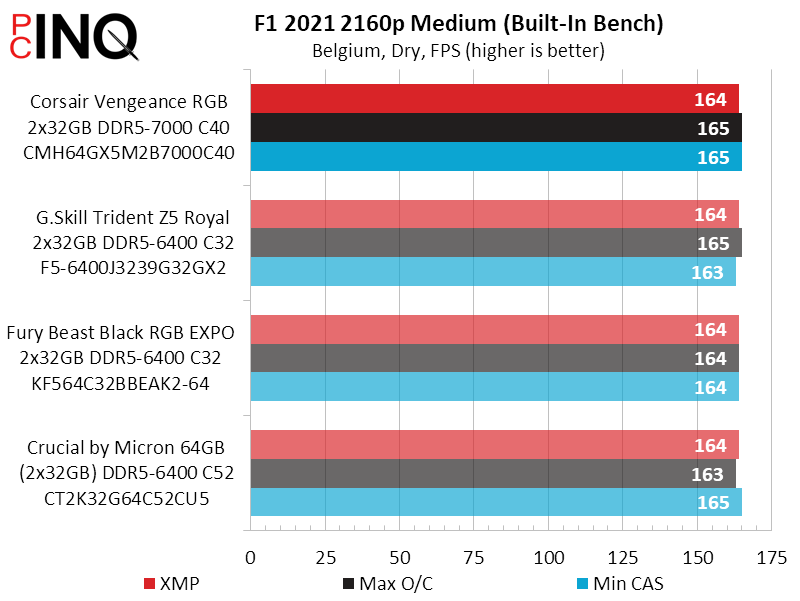
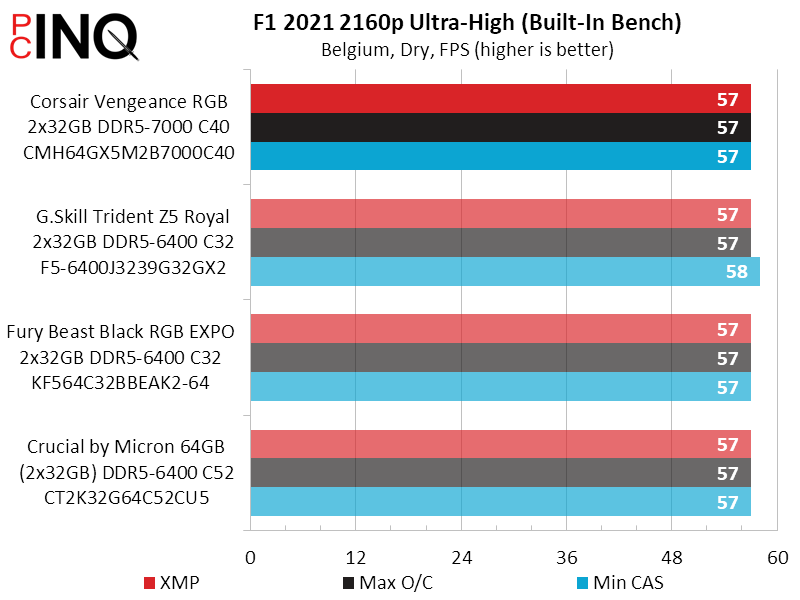
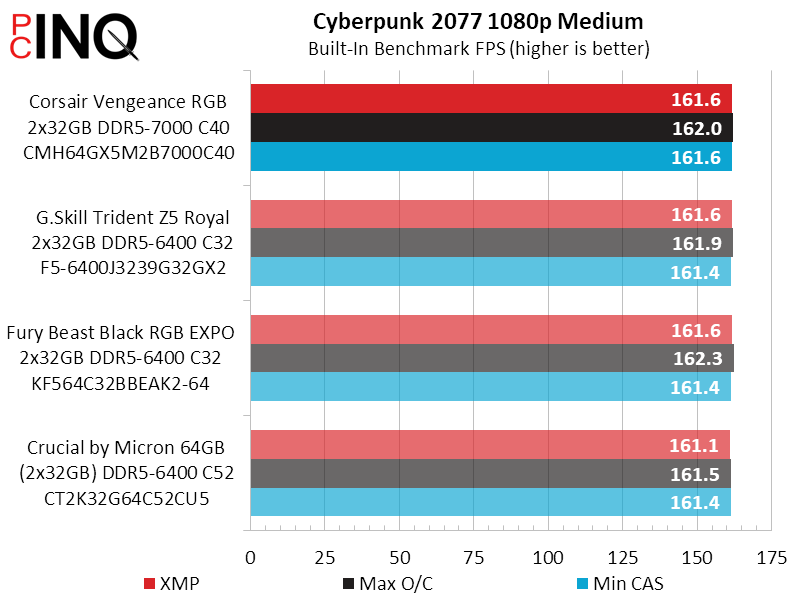
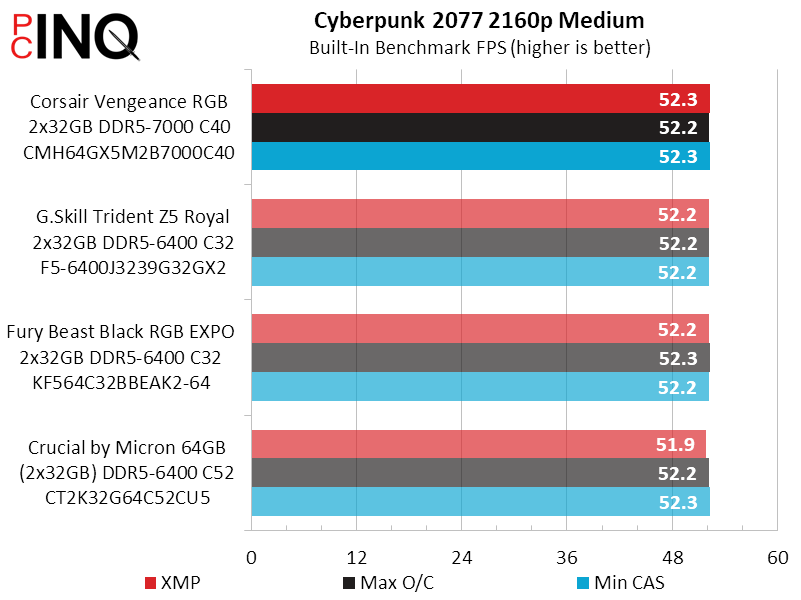
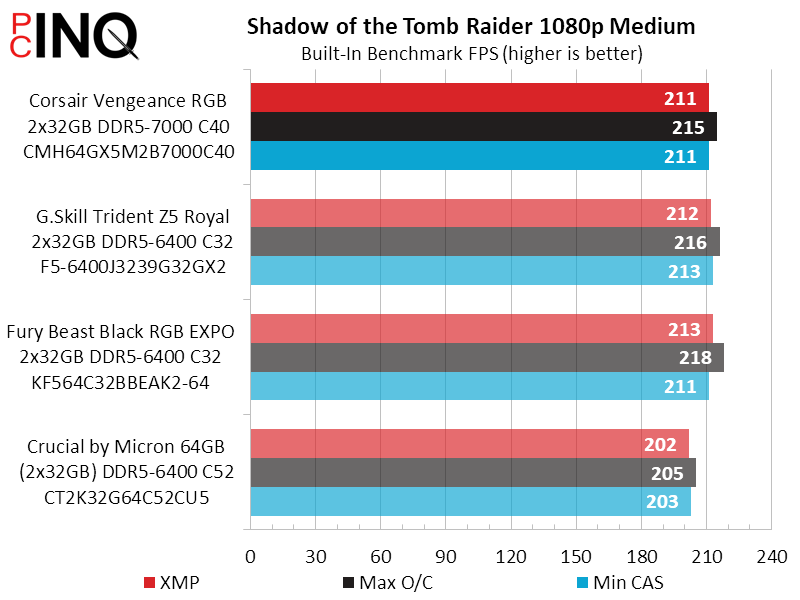
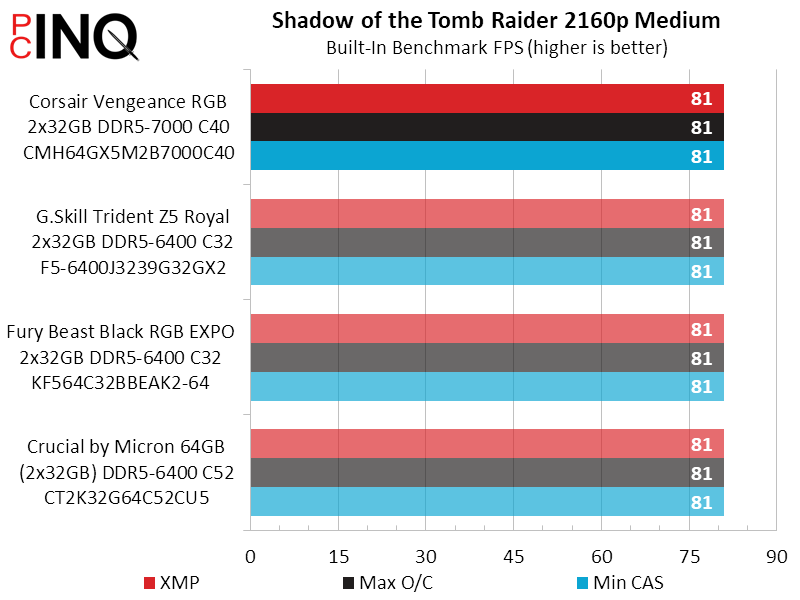
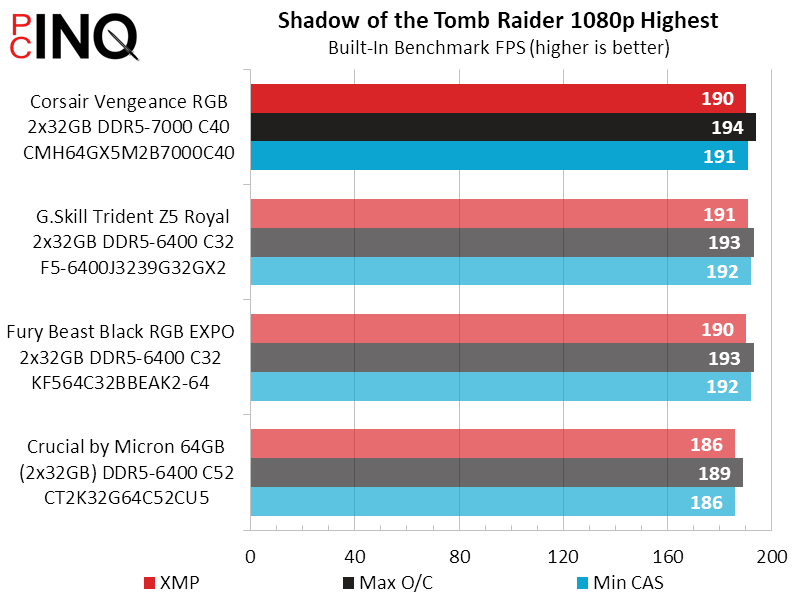
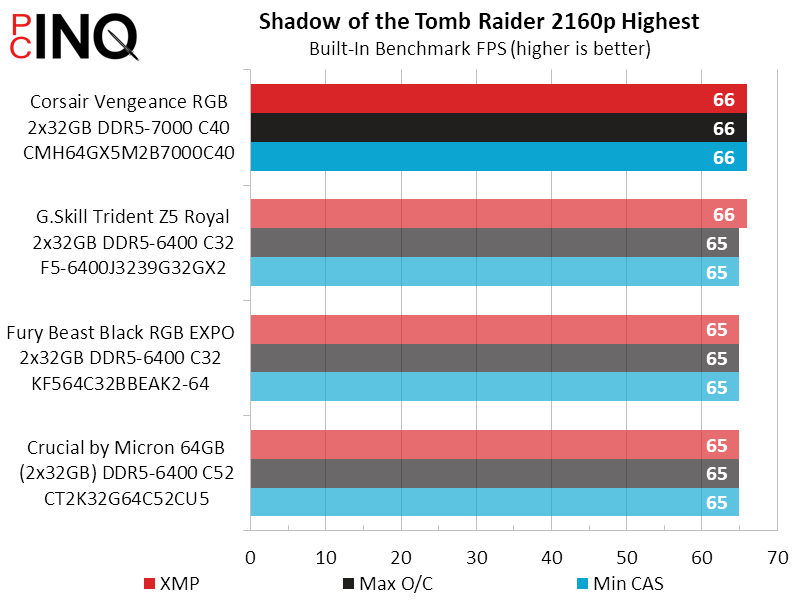
The same thing we said about games applies to timed tests, where the Vengeance RGB simply can’t outpace its similarly-configured competitors.
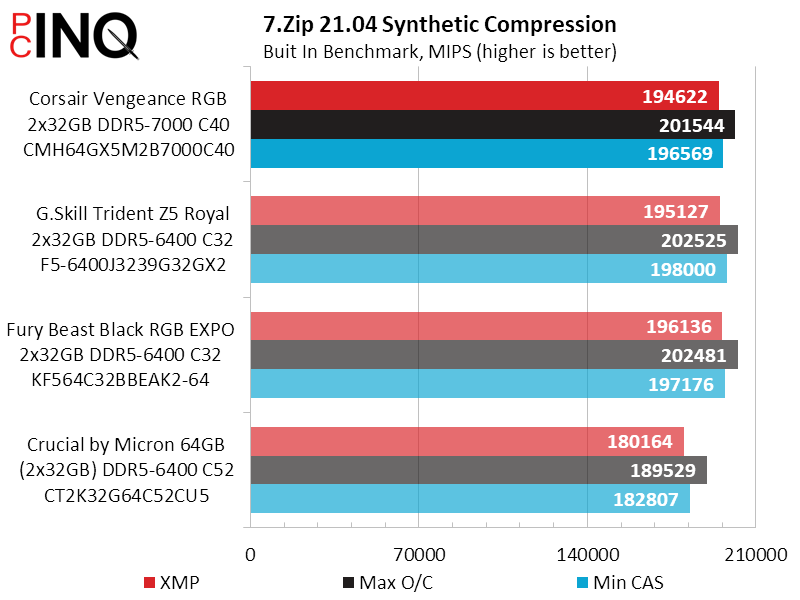
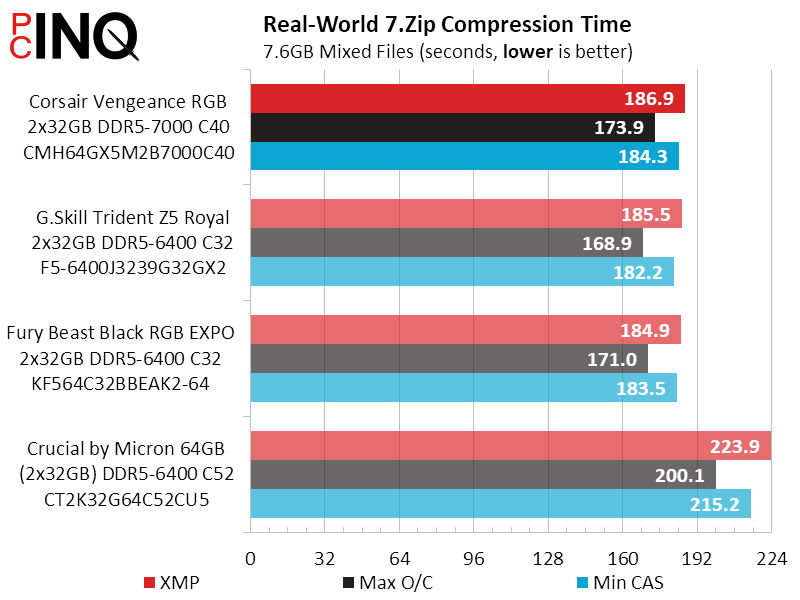
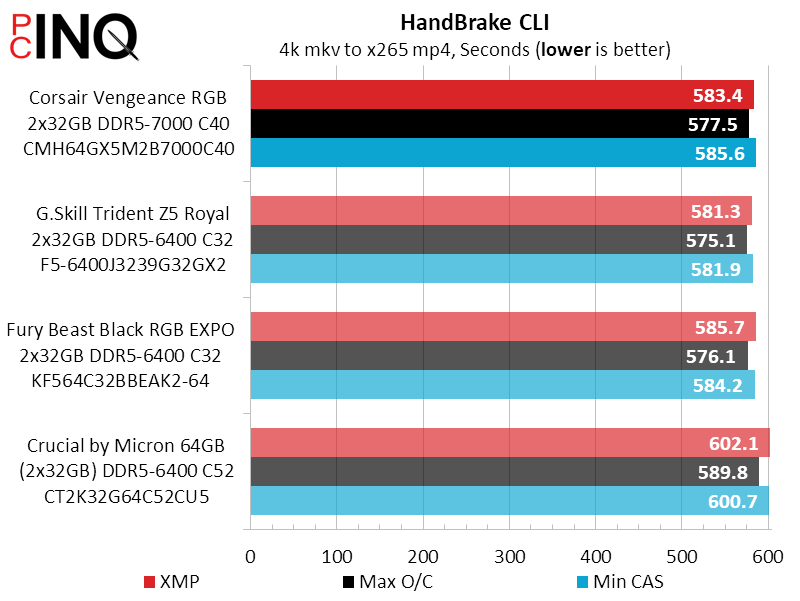
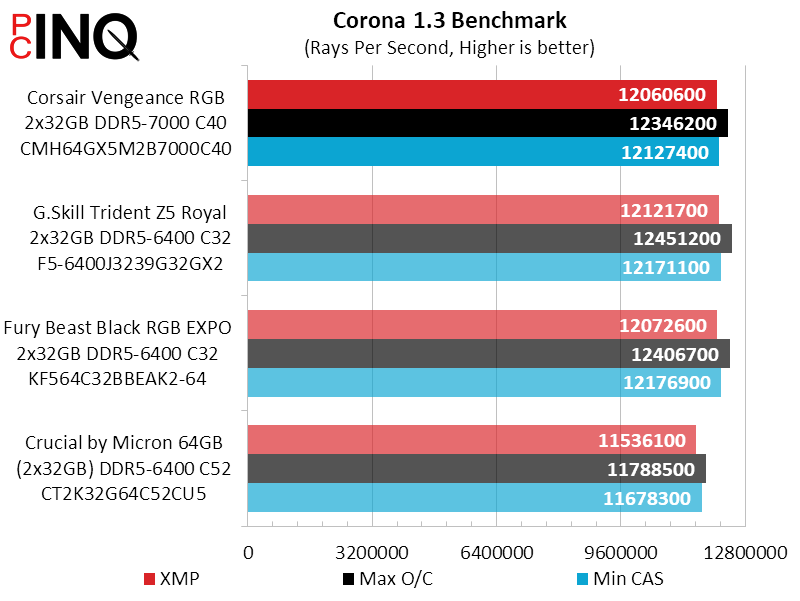
While our test didn’t reveal any big advantage for the Vengeance RGB’s higher (by 9%) DDR5-7000 XMP, we feel that it’s lengthier (by 25%) timings probably held it back. As our manual tuning test proved it equally capable, those who do such things should not be dissuaded by its other results.
| Corsair Vengeance RGB CMH64GX5M2B7000C40 | |
| Pros | Cons |
| Highest XMP bandwidth Highly tunable & overclockable | No fallback (lower) XMPs |
| The Verdict | |
| Vengeance RGB DDR5-7000 squeezes a little more XMP bandwidth from Hynix’s legendary 16Gb IC’s, but without a real-world performance advancement over similarly marketed competitors. | |
Find It at Newegg
(Click For Availability)


